-
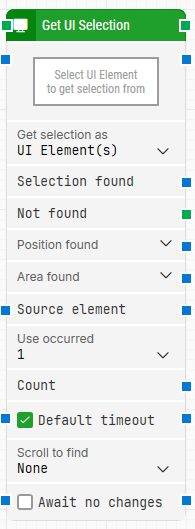
Block header: The green input connector triggers the block to start executing. The green output connector triggers when the UI selection has been retrieved. You can rename the block title by double-clicking the header text.
-
Select UI Element: The locator for the UI element to read the selection from. Capture it by clicking the property and selecting Capture new element. After capturing, you can edit it via Edit element, or remove it via Clear element.
-
Get selection as: Defines the format used to return the selection.
-
UI Element(s): Returns the selection as UI element handles, which can be passed as inputs to other UI blocks.
-
UI Element(s) Text: Returns the selection as the text value(s) of the selected UI element(s).
-
Selection found: The resulting selection returned by the block (for example, dropdown values or multi-select items). This output can be used as a source in other building blocks to narrow down searches.
-
Not found: Triggers if the UI element cannot be found within the configured timeout. If nothing is connected to this connector and the element is not found, the case ends with status Fail.
-
Position found: The position where the UI element was found in X, Y coordinates, relative to the top-left corner of the screen (typically 0, 0). In multi-screen setups, coordinates can be negative or exceed the primary screen resolution depending on where the window is located.
-
Area found: The position and size of the found UI element in X, Y, Width, Height coordinates, relative to the top-left corner of the screen (typically 0, 0). In multi-screen setups, coordinates can be negative or exceed the primary screen resolution.
-
Source element: Restricts the locator search to run inside a provided source element instead of searching globally in the application window. This is useful if you captured a parent container earlier (for example, a row or panel) and want this block to operate only within that context.
-
Use occurred: Selects which occurrence of the matching UI element to use when more than one match is found. Select All to iterate through all occurrences (this exposes Current index and Completed and triggers the top connector for each occurrence).
-
Current index: The current index when iterating through all occurrences (only shown when Use occurred is set to All).
-
Completed: Triggers when iteration through all occurrences is complete (only shown when Use occurred is set to All).
-
Count: The total number of found UI elements that match the locator.
-
Default timeout: Controls whether the block uses the default timeout from the flow settings or a custom timeout value.
-
Timeout (sec): Sets the maximum time spent searching for the UI element before the block gives up and triggers Not found.
-
Scroll to find: When set to a value other than None, the block scrolls while searching for the UI element. This is useful for scrollable content where elements are loaded asynchronously.
-
Max repeats: The maximum number of scroll attempts performed before giving up (shown when Scroll to find is not None).
-
Amount: The scroll amount used on each scroll attempt (shown when Scroll to find is not None).
-
Delay (sec): The delay between scroll attempts in seconds (shown when Scroll to find is not None).
-
Await no changes: When checked, the block waits for the screen to remain unchanged for a period before performing the selection retrieval.
-
Await Timeout: The number of seconds the screen must have had no changes before proceeding (used with Await no changes).