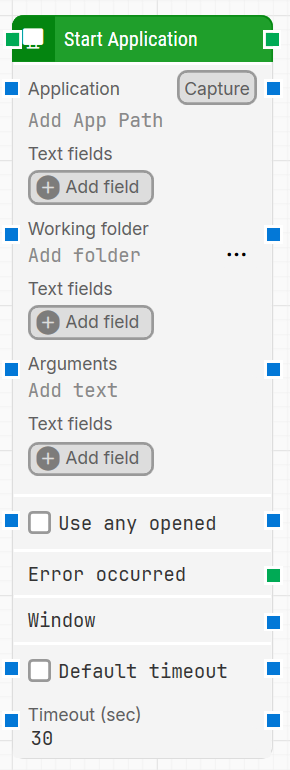
The Start Application building block starts a new desktop application as part of a desktop automation flow. It can launch an application by executable path (optionally relative to a working folder), pass arguments, and return a Window handle that can be reused by later desktop UI blocks.
Fully expanded, the Start Application block shows the following properties:
Note: The screenshot on this page uses the Elegance Design, introduced in 2025.3. If you are using an earlier version, your layout may look different.
Quick-start
Drag Start Application onto the canvas.
Connect the block in the flow and specify Application (required). Optionally set Working folder and Arguments, enable Use any opened if you want to reuse an existing instance, and configure timeout-related settings if needed.
Run the flow when it’s ready.
Building block parameters
Parameters
Block header: The green input connector triggers the block to start executing. The green output connector triggers when the desktop application has been opened. You can rename the block by double-clicking the header text and typing a new title.
Application: Specifies the application to start when the block executes. This should contain the path to the program’s .exe file. The value can be a full path, or a path relative to Working folder. Use Capture to select an already open application/window or a shortcut that points to an application; Leapwork captures the required information into the block.
Text fields: Stores key–value pairs that can be inserted as dynamic tokens into Application via Insert token. Fields can be renamed by double-clicking them, and the corresponding tokens update automatically.
Working folder: Sets the base directory used when running the command. When set, paths in Application can be provided relative to this directory instead of using fully qualified paths.
Text fields: Stores key–value pairs that can be inserted as dynamic tokens into Working folder via Insert token.
Arguments: Defines parameters supplied to the program when it is invoked.
Text fields: Stores key–value pairs that can be inserted as dynamic tokens into Arguments via Insert token.
Use any opened: When enabled, the block detects and uses an already open instance of the application UI window instead of starting a new one. For Universal Windows Platform (UWP) applications, this option only works when the application was captured using Capture in this block.
Error occurred: This output connector triggers if Start Application returns an error during execution. Use it to branch the flow for error handling.
Window: Contains a handle to the application window once it is found and focus is set. Use this handle when multiple application windows are open, to direct other desktop UI building blocks to use a specific window.
Default timeout: Controls whether the block uses the fixed default timeout behavior or a custom timeout value. When enabled, the timeout duration is fixed at 10 seconds. When disabled, Timeout (sec) is shown and can be edited.
Timeout (sec): Sets the maximum duration allowed for the application to start before the block gives up and triggers the message “Application failed to start due to timeout.” When Default timeout is not selected, this field is visible and editable, with a default value of 30 seconds.
Note: All cases have a global timeout configured in the Settings panel. This is unrelated to a single block’s timeout. However, a running case will automatically be cancelled if it runs for longer than the global timeout.