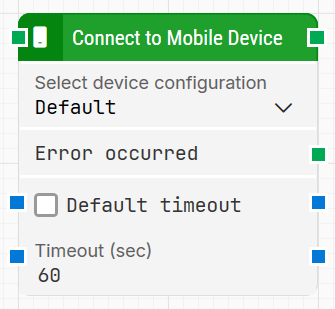
The Connect to Mobile Device block is used to connect a flow to one of the available mobile configurations. It lets you pick a specific configuration instead of always using the default one applied to all flows, so you can target different devices or environments as needed.
Fully expanded, the Connect to Mobile Device block shows the following properties:
Note: The screenshot on this page uses the Elegance Design, introduced in 2025.3. If you are using an earlier version, your layout may look different.
Quick-start
Drag Connect to Mobile Device onto the canvas.
In Select device configuration, choose the mobile configuration you want to use, and optionally adjust Default timeout and Timeout (sec).
Run the flow when it’s ready; the block will connect to the selected mobile device before subsequent steps execute.
Building block parameters
Parameters
Block header: Shows the current name of the Connect to Mobile Device block. You can rename it by double-clicking the header and typing a new title. The green input connector starts the connection attempt when the flow reaches this block, and the green output connector triggers when the device has been successfully connected.
Select device configuration: Displays a list of mobile configurations that have been set up by an administrator.
Choose which configuration the flow should use for this connection.
The default value corresponds to the configuration selected under Use configuration in the flow settings.
Error occurred: Green output connector that triggers if the Connect to Mobile Device block returns an error during execution (for example, if the device cannot be reached within the timeout). Use this connector to branch the flow for error handling, retries, or logging.
Default timeout: Controls how the timeout is determined:
When the checkbox is not selected, the block uses an explicit timeout of 60 seconds (or whatever value you set in Timeout (sec)).
When the checkbox is selected, the block uses the Default timeout value defined in the flow settings.
Timeout (sec) Specifies the maximum time allowed for connecting to the selected device before the block gives up and triggers Error occurred.
This timeout applies only to this block. Each case also has a separate global timeout configured in the Settings panel; if the case runs longer than that global timeout, it is automatically cancelled regardless of this block’s timeout.