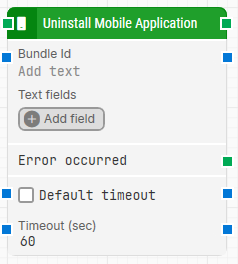
The Uninstall Mobile Application building block is used to uninstall an existing application from a mobile device.
Fully expanded, the Uninstall Mobile Application block shows the following properties:
Note: The screenshot on this page uses the Elegance Design, introduced in 2025.3. If you are using an earlier version, your layout may look different.
Quick-start
Drag Uninstall Mobile Application onto the canvas.
Connect the block in the flow and optionally specify Bundle Id, Text fields, Default timeout, Timeout (sec).
Run the flow when it’s ready.
Building block parameters
Parameters
Block header: The green input connector triggers the block to start executing. The green output connector in the header triggers when the mobile application has been successfully uninstalled. The block title (“Uninstall Mobile Application”) can be renamed by double-clicking it and typing a new title.
Bundle Id: The bundle ID (bundle identifier) that represents the mobile application’s unique identifier number.
Text fields: Key–value fields that enable the use of external values in Bundle Id. To use a value, right-click the Bundle Id field and select Insert token, then insert the field name. Fields can be renamed by double-clicking them, and inserted tokens update their visual appearance accordingly.
Add field: Adds a field that can be inserted as a token into Bundle Id.
Default timeout: Controls whether the block uses the flow’s default timeout or a fixed timeout. If the checkbox is not selected, the timeout is 60 seconds. If the checkbox is selected, the Default timeout value from the flow settings applies.
Timeout (sec): The maximum time spent searching for the application to uninstall before giving up. This is separate from the case global timeout in Settings, which can cancel a run if the whole case exceeds it.