The Get Mobile Number block fetches a number from a mobile application by reading it from a selected mobile element. If the block cannot find a suitable number within the timeout behavior, it triggers Not found so you can branch the flow.
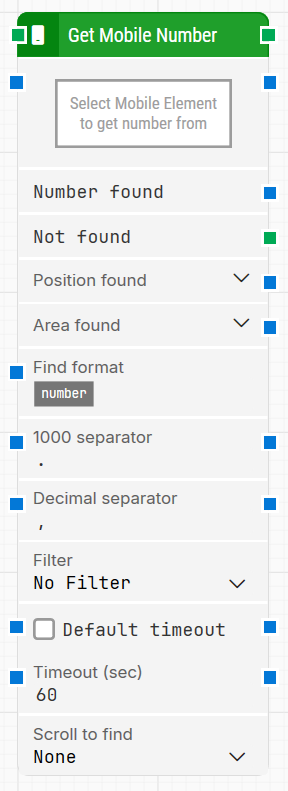
Fully expanded, the Get Mobile Number block shows the following properties:
Note: The screenshot on this page uses the Elegance Design, introduced in 2025.3. If you are using an earlier version, your layout may look different.
Quick-start
Drag Get Mobile Number onto the canvas.
Connect the block in the flow and specify Select Mobile Element to get number from (required). Optionally configure Find format, 1000 separator, Decimal separator, and Filter, then adjust timeout-related settings if needed.
Run the flow when it’s ready.
Building block parameters
Parameters
Block header: The green input connector triggers the block to start executing. The green output connector triggers when a number has been successfully found. You can rename the block by double-clicking the header text and typing in a new title.
Select Mobile Element to get number: Required. Contains the locator for the mobile element from which the number is extracted. You can capture the locator by right-clicking the property and selecting Capture new mobile element, or by clicking the property to open the mobile recorder. Clear the locator by right-clicking and selecting Clear mobile element.
Number found: Outputs the number that was found.
Not found: Triggers if a number is not found before the timeout. This is typically used to branch execution flow or explicitly fail a case by linking it to a Fail block.
Position found: Outputs the position where the number was found as X, Y coordinates. Use the expander to work with X and Y separately.
Area found: Outputs the position and size of the found number as X, Y, Width, Height, starting with the upper-leftmost pixel. Use the expander to work with the area’s position and size and their nested sub-properties separately.
Find format: Defines a format the number must match in order to be retrieved. For example, with Price: [NUMBER] USD, only numbers inside text such as Price: 123.00 USD are retrieved.
1000 separator: Defines the character used to separate thousands in the number. The default is taken from Flow’s Windows regional settings (typically , or .).
Decimal separator: Defines the character used to separate decimals in the number. The default is taken from Flow’s Windows regional settings (typically , or .).
Filter: Defines an additional rule the number must meet to be retrieved (for example, only retrieve numbers that are Greater than 100).
Default timeout: Controls whether the block uses the default timeout from the flow settings or a custom timeout value.
Timeout (sec): The maximum time spent searching for a number before giving up and triggering Not found. This field is used when Default timeout is not selected.
Note: All cases have a global timeout configured in the Settings panel. This is unrelated to the timeout of a single building block. However, a running case will automatically be cancelled if it runs for longer than the global timeout.