
The Start Mobile Application block is used to start a mobile app on a connected device. It identifies and launches the application by its bundle ID and allows dynamic input using tokens.
The block waits for the app to open and can fail gracefully if the application does not start within the specified timeout.
Fully expanded, the Start Mobile Application block shows the following properties:
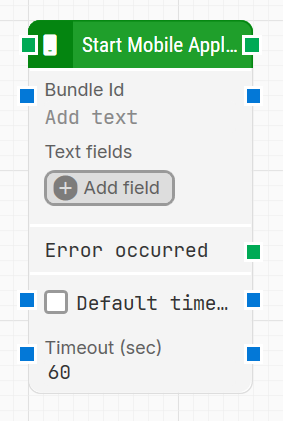
Note: The screenshot on this page uses the Elegance Design, introduced in 2025.3. If you are using an earlier version, your layout may look different.
Quick-start
-
Drag Start Mobile Application onto the canvas.
-
Specify the basic parameters required for this block to operate: Bundle Id, Default timeout, Timeout.
-
Run the flow when it’s ready.
Building block parameters
Resources
|
Topic |
Description |
|---|---|
|
Overview of what’s needed to enable mobile automation |
|
|
Steps to configure devices and environments for testing |
|
|
Frequently asked questions about mobile automation and troubleshooting |