
Set Mobile Orientation

A Set Mobile Orientation block is used to change the layout of the mobile screen while running the flow.

Fully expanded, the Set Mobile Orientation block shows the following properties:
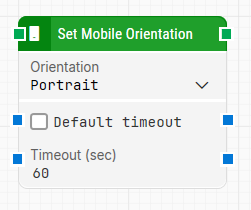
image-20251113-120248.png

Note: The screenshot on this page uses the Elegance Design, introduced in 2025.3. If you are using an earlier version, your layout may look different.

Quick-start

  1. Drag Set Mobile Orientation onto the canvas.

  2. Specify the basic parameter required for this block to operate: Orientation.

  3. Run the flow when it’s ready.

Building block parameters

Parameters
  • The Block Header: The green input connector in the header is used to trigger the block to start executing. The green output connector in the header triggers when the orientation has been successfully set. The title of the block (“Set Mobile Orientation”) can be changed by double-clicking on it and typing in a new title.

  • Orientation: Selects the screen orientation to apply on the mobile device.
    Values:

    • Portrait: Sets the device to portrait mode.

    • Landscape: Sets the device to landscape mode.

  • Default timeout: Specifies whether to use the flow’s default timeout settings. If unchecked, the block uses the local Timeout (sec) value.

  • Timeout: Maximum time in seconds to apply the screen orientation. If the action takes longer than this duration, the flow will proceed based on the timeout behavior.


Resources

Topic

Description

Mobile connections

Overview of what’s needed to enable mobile automation

Mobile configuration

Steps to configure devices and environments for testing

Mobile FAQs

Frequently asked questions about mobile automation and troubleshooting