
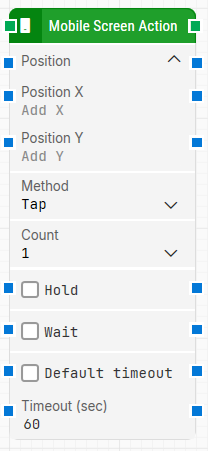
The Mobile Screen Action block performs common touch gestures; such as tap, swipe, spread, or pinch, by using screen coordinates instead of element identification. It is useful when you need to interact with areas that do not have stable element locators, such as swiping on a home screen or performing gestures on pages where elements cannot be reliably identified.
Note:
-
This block works with coordinates and it is useful when you swipe on a home screen or on a page.
-
The screenshot on this page uses the Elegance Design, introduced in 2025.3. If you are using an earlier version, your layout may look different.
Quick-start
-
Drag Mobile Screen Action onto the canvas.
-
Connect the block in the flow and optionally specify the basic parameters required for this block to operate: Position, Method, Count. (For a minimal setup, just connect its input and output, set Position and Method, and run the flow.)
-
Run the flow when it’s ready.
Building block parameters
Resources
|
Topic |
Description |
|---|---|
|
Overview of what’s needed to enable mobile automation |
|
|
Steps to configure devices and environments for testing |
|
|
Frequently asked questions about mobile automation and troubleshooting |