
The Click Web Position block is used to simulate a mouse click at a specific (X, Y) coordinate within the visible content area of a web browser. It is typically used for interacting with canvas-based elements, graphical controls, or layouts where traditional HTML element targeting is not practical.
Note: This block only works in browser windows launched using the Start Web Browser block. It is not compatible with Selenium Grid or cloud-based providers such as Sauce Labs and BrowserStack.
Fully expanded, the Close Web Browser block shows the following properties:
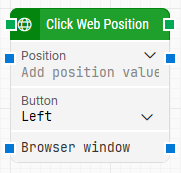
Note: The screenshot on this page uses the Elegance Design, introduced in 2025.3. If you are using an earlier version, your layout may look different.
Quick-start
-
Drag Click Web Position onto the canvas.
-
Specify the Position on the canvas to click.
-
Optionally adjust the Button (left/right, single/double click) and define a Browser window.
-
Run the flow when it’s ready.
Building block parameters
Resources
|
Topic |
Description |
|---|---|
|
Common questions about creating, running, and managing flows in Leapwork. |
|
|
Guidelines and solutions for identifying and fixing issues that occur when building or running flows in Leapwork. |