
The Get Web Attribute block retrieves the value of a specific HTML attribute from a web element, typically found using the Find Web Element block. This block only works within browser windows opened using the Start Web Browser block or one of its child windows.
It is often used to extract dynamic properties such as href, src, alt, title, or checked from web elements during test execution.
Fully expanded, the Get Web Attribute block shows the following properties:
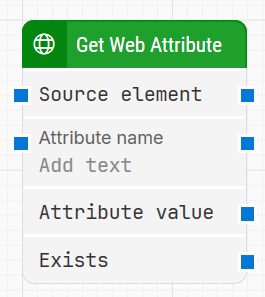
Note: The screenshot on this page uses the Elegance Design, introduced in 2025.3. If you are using an earlier version, your layout may look different.
Quick-start
-
Drag Get Web Attribute onto the canvas.
-
Connect Source element.
-
Run the flow when it’s ready.
Building block parameters
Resources
|
Topic |
Description |
|---|---|
|
Common questions about creating, running, and managing flows in Leapwork. |
|
|
Guidelines and solutions for identifying and fixing issues that occur when building or running flows in Leapwork. |