
The Hover Web Position block moves the mouse cursor to a specific coordinate on the canvas of a browser window during test execution. This is used to simulate user hover interactions at precise screen locations.
Note: This block only works with browser windows that were started using the Start Web Browser block. Multiple browser windows are not supported on Selenium Grid or cloud providers such as Sauce Labs and BrowserStack.
Fully expanded, the Hover Web Position block shows the following properties:
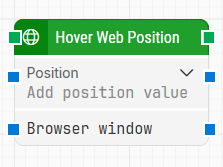
Note: The screenshot on this page uses the Elegance Design, introduced in 2025.3. If you are using an earlier version, your layout may look different.
Quick-start
-
Drag Hover Web Position onto the canvas.
-
Specify the basic parameter required for this block to operate: Position.
-
Connect the Browser window if targeting a specific browser instance.
-
Run the flow when it’s ready.
Building block parameters
Resources
|
Topic |
Description |
|---|---|
|
Common questions about creating, running, and managing flows in Leapwork. |
|
|
Guidelines and solutions for identifying and fixing issues that occur when building or running flows in Leapwork. |
|
|
Guidelines for understanding and using the Strategy Editor in Leapwork to define, refine, and validate robust locator strategies for UI elements using DOM structure, tokens, and wildcards. |