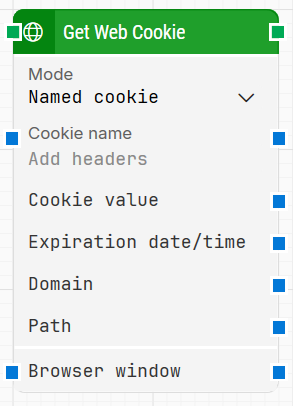
The Get Web Cookie building block retrieves one cookie or all cookies that were previously set in the current browser window. This block only works with browser windows opened using Start Web Browser. Browsers started this way begin with empty history, cache, and cookies, so only cookies created during the run (or set by your flow) will be available.
Fully expanded, the Get Web Cookie block shows the following properties:
Note: The screenshot on this page uses the Elegance Design, introduced in 2025.3. If you are using an earlier version, your layout may look different.
Quick-start
Drag Get Web Cookie onto the canvas.
Connect the block in the flow and optionally specify the basic parameters required for this block to operate: Mode, Browser window and (when applicable) Cookie name.
Run the flow when it’s ready.
Building block parameters
Parameters
Block header: The green input connector triggers the block to start executing. The green output connector triggers when the cookie or cookies have been retrieved. You can rename the block by double-clicking the header text and typing a new title.
Mode: Selects whether the block retrieves a single named cookie or iterates through all cookies in the browser window.
Get named cookie: Retrieves a single cookie specified by Cookie name.
Get all cookies: Iterates through all cookies and exposes each cookie’s properties as the block runs.
Completed: Triggers when the block has finished iterating through all cookies. This connector is used when Mode is set to Get all cookies.
Cookie name: Specifies the cookie name to retrieve when Mode is Get named cookie. When Mode is Get all cookies, this outputs the name of the current cookie during iteration.
Cookie value: Contains the value of the retrieved cookie. When Mode is Get all cookies, this is the value of the current cookie during iteration.
Expiration date/time: Contains the expiration date/time of the retrieved cookie. When Mode is Get all cookies, this is the expiration date/time of the current cookie during iteration.
Domain: Contains the domain of the retrieved cookie. When Mode is Get all cookies, this is the domain of the current cookie during iteration.
Path: Contains the path of the retrieved cookie. When Mode is Get all cookies, this is the path of the current cookie during iteration.
Browser window: Specifies which browser window the block should use.
Note: Multiple browser windows are not supported by Selenium Grid or external cloud providers such as Sauce Labs and BrowserStack.