
The Click Electron Position block is used to perform a mouse click at a specific position (X, Y coordinates) in an Electron application window. It is useful when you already have a position value from another block (for example, Position found from a locator block) and want to replay a click at that exact location rather than targeting a captured element again.
Fully expanded, the Click Electron Position block shows the following properties:
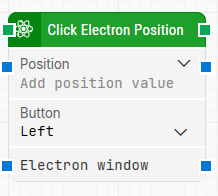
Note: The screenshot on this page uses the Elegance Design, introduced in 2025.3. If you are using an earlier version, your layout may look different.
Quick-start
-
Drag Click Electron Position onto the canvas.
-
Connect it in the flow and provide a Position value; optionally adjust the Button and Electron window parameters as needed.
-
Run the flow when it’s ready to execute the click at the specified position.
Building block parameters
Resources
|
Topic |
Description |
|---|---|
|
Common questions about creating, running, and managing flows in Leapwork. |
|
|
Guidelines and solutions for identifying and fixing issues that occur when building or running flows in Leapwork. |
|
|
Guidance and solutions for diagnosing and resolving issues related to Electron-based automation and environments |