
The Handle Electron Alert block is used to manage system alerts triggered by Electron-based applications. These alerts typically appear as native modal dialogs and can interrupt test execution if not handled. This block allows you to define how the alert should be addressed, either by accepting or dismissing it, and optionally lets you interact with alerts that include text input.
It is commonly used in flows that automate Electron apps with multiple confirmation or prompt dialogs during execution.
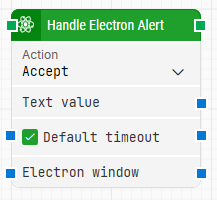
When fully expanded, the following is an example of the Handle Electron Alert block:
Note: The screenshot on this page uses the Elegance Design, introduced in 2025.3. If you are using an earlier version, your layout may look different.
Quick-start
-
Drag Handle Electron Alert onto the canvas.
-
Choose the required Action (Accept or Dismiss).
-
If needed, enter a Text value or connect the correct Electron window.
-
Run the flow when it’s ready.
Building block parameters
Resources
|
Topic |
Description |
|---|---|
|
Common questions about creating, running, and managing flows in Leapwork. |
|
|
Guidelines and solutions for identifying and fixing issues that occur when building or running flows in Leapwork. |
|
|
Guidance and solutions for diagnosing and resolving issues related to Electron-based automation and environments |