-
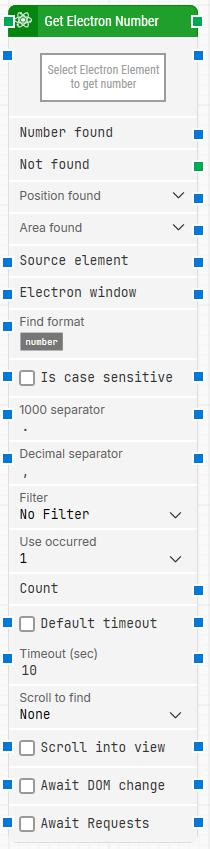
Block header: The green input connector triggers the block to begin execution. The green output connector triggers when an Electron number is successfully fetched. You can rename the block by double-clicking the header text and typing in a new title.
-
Select Electron Element to get number: Contains the locator for the Electron element from which the number is extracted. You can capture it by right-clicking and selecting Capture new Electron number, and clear it by right-clicking and selecting Clear Electron number.
-
Number found: Contains the number that was found. This output can be connected and used in other building blocks.
-
Not found: Triggers if the Electron element is not found before the timeout. This is typically used to branch the execution flow or to explicitly fail a case by linking it to a Fail block.
-
Position found: The application canvas position where the element was found in X, Y coordinates (top-left of the application canvas is 0, 0).
-
Area found: The position and size of the found element in X, Y, Width, Height coordinates, starting with the upper-leftmost pixel.
-
Source element: Lets you limit the locator to only search inside a specific source element by selecting the Element option, so the locator applies within that source element rather than the whole window.
-
Electron window: Contains a handle to the Electron window once it is found and focus is set. You can pass this to other Electron building blocks to direct them to a specific window when multiple windows are open.
-
Find format: Defines a format the number must match to be retrieved. For example, with Price: [NUMBER] USD, only numbers inside text like Price: 123.00 USD are retrieved.
-
Is case sensitive: Controls whether Find format is case sensitive. By default, it is case-insensitive.
-
1000 separator: Defines the character used to separate thousands. By default, this uses Leapwork’s Windows regional settings (typically “,” or “.”).
-
Decimal separator: Defines the character used to separate decimals. By default, this uses Leapwork’s Windows regional settings (typically “,” or “.”).
-
Filter: Defines a filter the number must meet to be retrieved (for example, only retrieve numbers that are Greater than 100).
-
Use occurrence: Selects which occurrence of the Electron element to use when more than one match is found. Select All to iterate through all occurrences.
-
Count: Contains the total number of found occurrences that match the configured locator and criteria.
-
Default timeout: If the checkbox is not selected, the timeout is 10 seconds unless changed manually. If the checkbox is selected, the flow’s Default timeout under Max. run time applies.
-
Timeout (sec): The maximum time spent searching before giving up and triggering Not found.
-
Scroll to find: When set to a value other than None, the block uses scrolling while searching for the Electron element.
-
Max repeats: The maximum number of times to perform a scroll before giving up searching for the Electron element.
-
Amount: The amount of scrolling that will be performed on each scroll repeat.
-
Delay (sec): The delay in seconds between each of the scroll amounts.
-
Scroll into view: When selected, any found Electron element is automatically scrolled into view.
-
Await DOM change: Delays the search until there have been no changes to the application’s DOM for a specified period (for example, three seconds). Regardless of this checkbox, the search proceeds after waiting a maximum of 30 seconds.
-
Await Requests: Delays the search until there have been no active XHR requests for a specified period (for example, three seconds). Regardless of this checkbox, the search proceeds after waiting a maximum of 30 seconds.